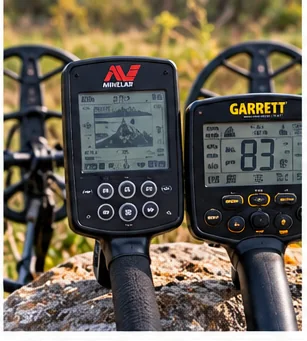
A pre-spring tune-up means cleaning the kit, inspecting cables, connectors, coil and shaft, testing batteries, checking firmware, writing down your settings and running a bench test on known targets. Do it in winter so you have time to repair or replace what you find before the first warm weekend.
In This Guide
Affiliate disclosure: We may earn a commission from qualifying purchases made through links on this page, at no extra cost to you.
Why a winter tune-up beats a spring scramble
The first warm weekend is the worst time to find out that a cable has gone intermittent or a battery will not hold a charge. Repair shops and parts sellers fill up as the weather turns, and a part ordered in March may not arrive before you want to hunt. A pre-spring check, done on a dull evening in winter, gives you time to fix what you find.
This checklist is organized by area, so you can work through the kit in about an hour, with a pencil and a notepad. It does not replace the manual, which is the authority on what you may open, clean or adjust on your model. If you want a general maintenance routine, our metal detector care guide covers the year-round habits. This one is a seasonal inspection.
Start with a clean, dry kit
Empty the bag onto a table. Wipe down the shaft, coil, armrest and control box with a damp cloth, then dry them. Tip out any sand or grit from the coil cover, the pouch, the digger case and the bottom of the bag. If the kit came in from a cold garage, let it warm up in its case before you open it, as explained in our condensation guide.
Cleaning first is not cosmetic. Dirt hides cracks, and a clean machine shows you where the wear is.
The checklist
| Area | What to look for | If you find a problem |
|---|---|---|
| Coil cable | Kinks, flat spots, cracked insulation or a stiff section, especially near the coil and the connector | Do not tape and hope; ask the maker or a repair service about replacement |
| Connectors | Bent pins, green or white crusting, grit, loose fit or a collar that will not tighten | Dry and clean only as the manual allows; if damaged, get it serviced |
| Coil shell | Deep gouges, cracks, soft spots and worn edges, plus the bolt, washers and ears | Replace washers if the maker lists them; consider a cover or skidplate for a worn shell |
| Coil cover | Trapped sand, torn edges and a loose fit | Empty and wipe; replace if it no longer fits snugly |
| Shaft and cam locks | Slipping sections, stiff or gritty locks, loose fasteners and stripped threads | Clean the sections; tighten only as far as the manual says |
| Armrest and cuff | Cracked plastic, torn straps, loose hardware and a worn pad | Replace worn parts that are made for your model |
| Control box | Cracks, sticky buttons, scratched display, damaged seal surfaces | Check the manual before opening anything; contact the maker for sealed parts |
| Headphone port and cable | Crackling, a cable that cuts out when moved, a loose plug | Try a second pair to find out whether the fault is the port or the cable |
| Pinpointer | Battery condition, weak vibration, a cracked tip, damaged seals | Replace batteries; check the manual for seal care and service |
If a part turns out to be worn, do not buy a replacement until you have the model name, generation and any version number written down. Parts that look alike can still differ between models, so match by the exact model, not by appearance.
Batteries and charging
Pull the batteries from any detector or pinpointer that uses replaceable cells, then look at the contacts and the compartment for corrosion. Check rechargeable packs and built-in batteries for swelling, a case that no longer closes properly or a charge that does not last. If the manual gives guidance on charge level for long-term storage, follow it. Our cold-weather battery guide and the batteries and charging guide cover what to expect.
Do a full charge cycle on the bench. A battery that lasted all day in September may not do so after a winter in a cold garage, and it is better to learn that now than in the field.
Do not forget the small batteries. Pinpointers, wireless headphones and remote transmitters tend to be forgotten in a drawer, and they are the first things to fail on a cold morning. Charge or replace them now, and label any that you are unsure about.
Firmware and settings
Many modern detectors can take firmware updates, and the maker's site or companion app is where updates and instructions live. Check what version your machine has and whether a newer one exists. Read the update notes first, and follow the maker's steps exactly, including anything about power and cables during the update. Our firmware update guide explains why this matters.
While you are at it, write down your favorite settings: program, sensitivity, tone choices and ground balance. Some updates or resets restore defaults, and a note in the bag saves you from rebuilding your setup from memory. Photograph the screen if that is easier.
Run a bench test
Once the physical checks are done, test the machine. Use a few coins or targets you know well and sweep them in the air at consistent distances, and record how the machine behaves. Look for steady target ID numbers, a clean signal and no unexplained chatter. If you notice noise, our interference guide explains how to separate electrical noise from a real fault. A written baseline lets you compare next season, and it tells you quickly whether something has changed.
Small parts and cable organizer
A compact organizer for spare washers, bolts, cable ties and batteries keeps the bits you need in one place. Choose one that closes firmly.
Restock the kit and the paperwork
- Digging tools: clean and sharpen blades, check the handle and the sheath.
- Pouch and bags: repair stitching, replace worn zippers and add a spare trash bag.
- Serial number and model: record them and keep a photo of the receipt. Warranty rules differ by maker, so check yours.
- Site list: review your permissions, rewrite any that expired and start researching new sites. Our site research guide is a good winter project.
- Spares: a spare set of headphones, cable ties and batteries are cheap insurance for a long day.
Replacement hook-and-loop cable wraps
Reusable wraps keep the coil cable tidy without taping it. Choose a width that suits your shaft.
If your list of problems is long, our accessory buying checklist will help you decide what is worth replacing and what is worth skipping.
Bottom line
Do the tune-up while the ground is still frozen: clean the kit, inspect cables, connectors and coil wear, test batteries, check firmware and write down your settings, then run a bench test with known targets. Note every part that needs replacing, and write down the exact model before you order.
Frequently Asked Questions
When should I do a metal detector tune-up?
Winter or early in the off-season is ideal. Parts and repair services get busy as the weather turns, so you want time to fix what you find.
What should I check on a metal detector before spring?
Check the cable and connectors, the coil shell and cover, shaft and cam locks, armrest, headphone port, batteries and charging, and firmware. Then run a bench test.
Should I update my detector firmware before the season?
Check whether a newer version exists on the maker site or app, read the update notes and follow the instructions exactly. Write down your settings first in case they reset.
How do I bench test a metal detector?
Sweep known coins or targets in the air at consistent distances and note the target ID, signal and noise. Keep the notes so you can compare next season.
Can I open the control box to clean it?
Only if your manual says you may. Sealed parts are best left to the maker or a repair service.
Sources and verification
This is a general maintenance checklist. It quotes no manufacturer specifications, service intervals or battery figures.
The manual for your model is the authority on what you may open, clean, adjust or update. Warranty terms and service options differ by maker, so check yours before you start repairs.
DetectorGear.co is a participant in the Amazon Services LLC Associates Program and the eBay Partner Network. When you purchase through links on this page, we may earn a commission at no additional cost to you. Affiliate relationships do not influence our editorial recommendations. Learn more.